
What changed
Users can now choose how a Statement of Account is generated from Master Account > Debtors > Print SOA. The default Outstanding Only mode keeps collection work focused, while Activity provides a complete view of debtor movements for a selected period.
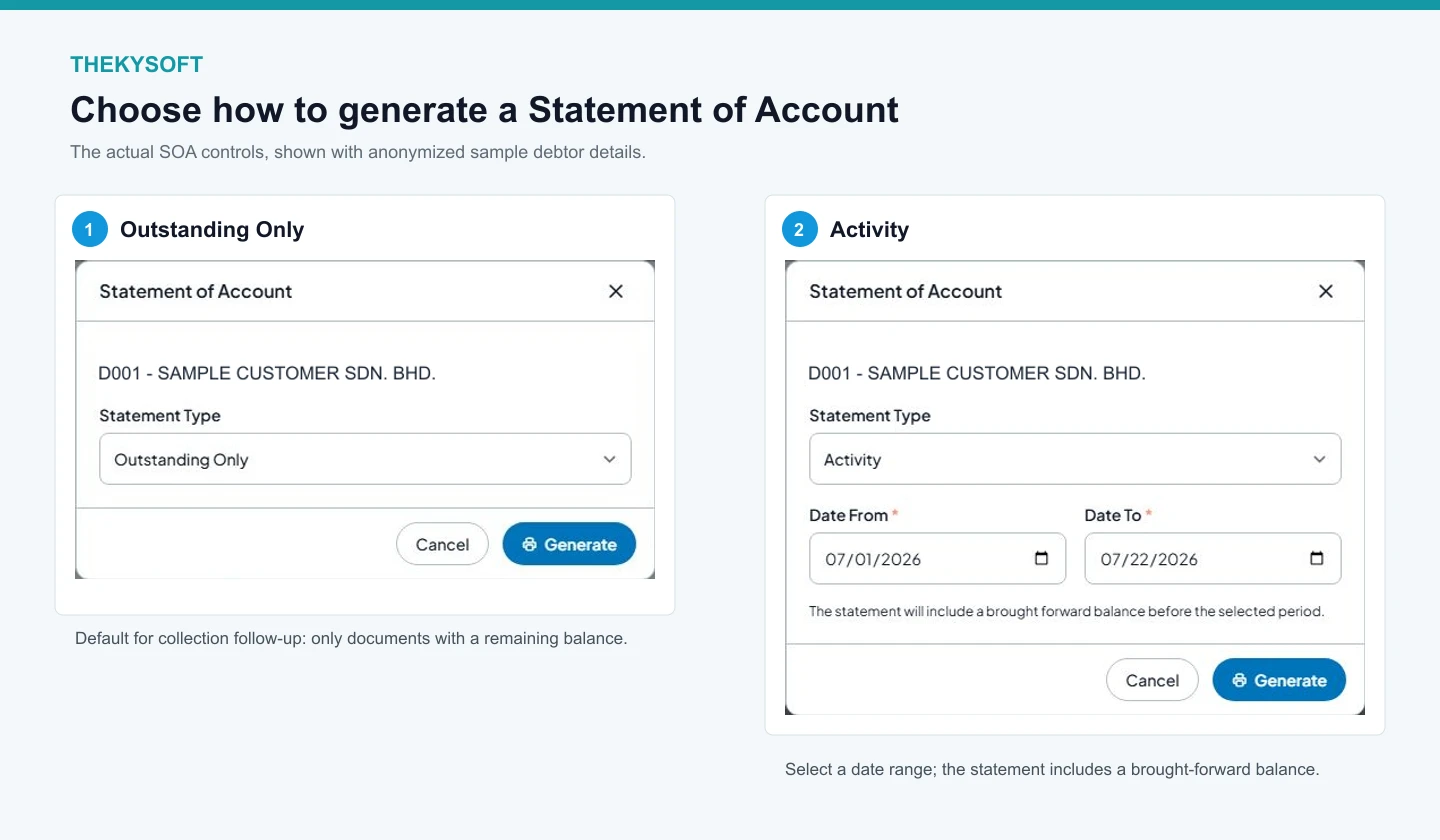
The actual SOA controls with anonymized sample debtor details.
Outstanding Only
Use this default mode when following up on unpaid documents. It includes only invoices, debit notes, credit notes, receipts, refunds, and contra entries that still have a remaining balance. Debit and credit columns show the outstanding amount for each document.
Activity for a selected period
Choose Activity and enter Date From and Date To. The statement begins with one brought-forward balance for activity before the selected start date, then lists all debtor movements in the period. The Balance column remains a chronological running balance.
How to generate the statement
Open Master Account, select Debtors, choose Print SOA, select the statement type, complete the dates when Activity is selected, and click Generate.
Email and reminder behavior
Automated outstanding emails and reminders continue to use Outstanding Only. The Activity option is available for on-demand statements generated from the debtor modal.